Video or Audio at an Event: First Steps
Events with High-Profile Speakers:
If you are working with high-profile speakers or panelists, or if your event is especially newsworthy, please let the Office of Communications know about your plans as early as possible.
Request AV Services:
Audio and video recording services for events on campus are available from HLS Information Technology Services.
Guidelines for Recording Audio / Video at HLS Events
Review the Harvard Law School campus filming, photography, and recording policies prior to planning your event. These guidelines pertain to faculty, individual students, academic and administrative units, official student organizations, and third parties.
Inform the audience that the event is being recorded
Announce at the beginning of each event (preferably on the recording) that the session is being recorded. Post signs at event entrances informing attendees that the event will be recorded. In general, try to avoid recording the audience whenever possible.
- Here’s a sign you can post at the event: Video Recording Sign
- All signs must be placed in sign holders, and not taped to walls or doors. You may request sign holders in EMS or by contacting the Office of Events Scheduling and Support.
Get signed Recording License Agreements
Ensure that anyone who will appear on the video or audio recording submits the following form prior to the event. Signed PDF versions of the form should be returned to the HLS Office of Communications (contact info below):
Copyright considerations
Be sure to work with the speaker to ensure that they own the copyright to their materials, and are not displaying graphics or any other content owned by other parties.
Working with Outside Film Crews
If you are using an outside vendor for video or photography on the HLS campus, please refer to the recording guidelines. You should also make sure that the vendor is aware of these restrictions. (They will be asked to sign a release agreeing to these terms.)
Non-Harvard Law School affiliates must receive permission from the HLS Office of Communications before taking photos or recording audio/video on campus. This allows us to alert all applicable personnel, including Campus Police and ITS.
To request permission, non-Harvard Law School affiliates should submit the Harvard Law School Campus Photography/Recording Permission Request at least 72 hours before arriving on campus.
Please note these restrictions for photography/recording on the HLS campus:
- All on-campus recording by third parties — including filming, photography, or other recording — requires the express permission of all recorded individuals who are identifiable, including students, faculty members, staff members, or bystanders. Recording of identifiable individuals – including passersby – without their express permission is strictly prohibited.
- All on-campus recording requests by a third party must be sponsored by a current HLS faculty member, staff member, or individual student not working with an official student group. (Students acting on behalf of official student groups — student organizations, journals, or student practice organizations — are subject to the guidelines in the “Student group recording at HLS” section above.)
- All on-campus recording must be completed promptly and unobtrusively, without disruption to the academic environment or interference with building access, pedestrian flow, or scheduled events.
- All requests to record in-person events (including lectures and panels) occurring on the HLS campus will be reviewed on a case-by-case basis by the HLS Communications Office. For such requests to be considered, third parties must first obtain in advance written approval from the event organizers, who must also meet the following conditions:
- All event participants (including faculty, staff, students, and audience members) must be given advance notice of any recording taking place.
- Notice that the event is being filmed, photographed, or otherwise recorded must be included in any listing on the HLS Events Calendar.
- Recording License Agreements must be obtained from each planned speaker or panelist.
- Recording of, or inside, shared indoor community spaces by third parties — including lobbies, hallways, dining areas, housing facilities, and inside the Harvard Law Library — is strictly prohibited, unless temporarily authorized by the HLS Communications Office for a specific institutional purpose (such as Class Day and Commencement).
- Recording of, or inside, HLS class or course meetings is strictly prohibited.
- Requests to record B-roll of the campus or photograph outdoors, and which meet all other relevant recording guidelines and restrictions, will be considered on a case-by-case basis.
- On-campus recording for entertainment, commercial purposes, advertising, or promotion of products or services is strictly prohibited.
- Use of a previously approved recording for entertainment, commercial purposes, advertising, or promotion of products or services is strictly prohibited.
- HLS reserves the right to decline authorization for any reason. HLS also reserves the right to revoke authorization for failure to abide by any of the policies listed above.
Additional considerations for third parties:
- While on the HLS campus, third parties authorized to record should be prepared, upon request, to present the email notification received from the HLS Communications Office.
- HLS does not sign third-party location release forms.
- Third parties may not represent that Harvard or HLS endorses their project.
- For information about nearby parking, visit the Harvard University Transportation and Parking website. Metered street parking is also available near campus.
- Requests involving locations beyond HLS (such as Harvard Yard) should be submitted through the Harvard Public Affairs and Communications (HPAC) website or directly to the communications office of the relevant Harvard school or unit.
HLS Multimedia Studio
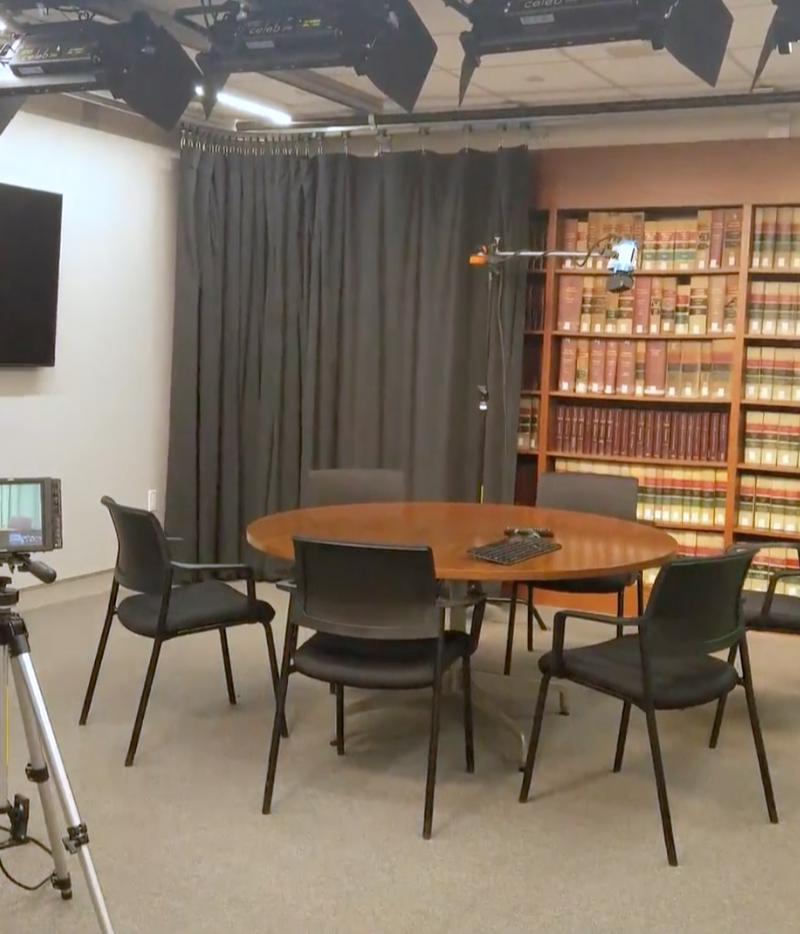
The Office of Learning Experience and Innovation runs a multimedia studio with variety of camera, lighting, and background options available for video and audio recording. Recordings in this studio can also be broadcast to classrooms on campus or livestreamed on Facebook or YouTube. This studio is also equipped with a Logitech camera and monitor to support web conferencing and Zoom calls.
Zoom Backgrounds
Get campus images and templates for creating your own HLS-branded background for video meetings.